Storage File System in Computer
By definition file systems have a common understanding of the current two, the first file system as a hierarchical file system on a computer. This hierarchy set structure of files and directories on storage media. Linux system has a directory structure like a tree, with the root (/) as the primary (root) followed by files, directories and subdirectories underneath. The second sense, the file system can also be interpreted as a file storage system on the storage media.
This set of formatting storage media / partition, so it can be used to store files. Further discussion on this matter can be viewed on the material on the hard drive format. So the first sense more emphasis on hierarchy file while the second type. At this meeting the discussion will focus on the file system as a hierarchical file on the computer.
In the Linux system using the path indicated by the mark / as a separator between folders or files. Example: /etc/bind/named.conf. Thus, the symbol / is also used to designate the highest directory (root) can also be used as a separator between the hierarchy of files in Linux. Linux has its own rules in determining the directory hierarchy that exists and has been arranged in the Filesystem Hierarchy Standard (FHS) whose standardization is currently managed by the Linux Foundation.
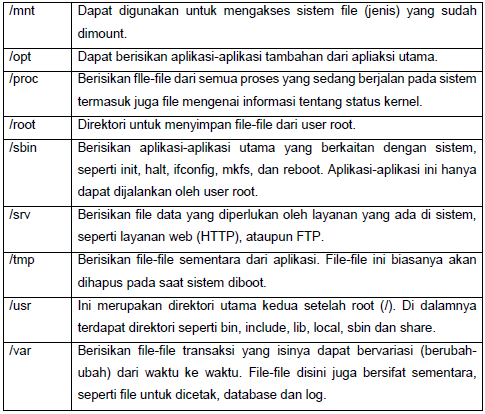
FHS is now up to version 2.3 which was released in 2004. In FHS document has been designated directories in UNIX and its derivatives. Here’s a table directories that have been standardized for use together.

See from the list above grouping can also be done by looking at the function as follows.
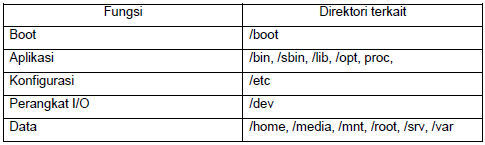
In the Linux system everything is a file. All I / O devices connected to the computer managed by Linux like other files, as shown in the / dev directory containing all the files on the hardware that is connected to the computer. There is also a / proc which contains all the files of the process that is currently running.
