Admin GUI
The client computer is a computer that acts as the access various services on the network. The services provided by a computer or other resource that acts as a server in the network. So, in general, clients are users of the service, while the server is a service provider. The service here could be, internet access services, access files or other. In order to use the services provided the client computer must be connected to the network.
There are three ways of connections that can be done to connect to the network, through cable (wired connection), cordless (wireless / Wi-Fi connection), and dial-up connections. Cable connection in question here is when the computer is connected to the network using an ethernet cable. These cables connect the RJ-45 jack (on the wired network card [LAN Card]) on the computer to the switch or router on the network.
Wireless connection is the connection type that utilizes radio antenna devices (card wireless lan) in the computer to connect to network devices, such as switches or routers with wireless capability. Currently the facility more wireless network card pinned on the client computer device that is moving (mobile / portable) such as a laptop, tablet or smartphone and no longer contains the LAN Card for easier switching locations without the need to carry extra cables.
Dialup connection devices utilize internal modem (default computer) or external, such as a USB modem to connect to the network, especially the Internet. This type of connection utilizes the telephone network to connect to the internet. Client computers to connect to the network must have an address. These addresses stated in the IP protocol. There are two mechanisms that can be used to provide IP on the computer.
– Automatically, using rental services IP from the DHCP server.
– Manually, by selecting a corresponding IP address to the network you want to enter.
In addition to providing IP addresses, other configuration also needs to be done is to determine the address of the DNS server and proxy server if you want to access the internet. DNS server address and the proxy server can be known by contacting the network administrator at the location of each. If in a computer network is already contained rental service IP (DHCP server) then it is usually no longer necessary, because every time hire will also be given IP address and its proxy DNS.
addressing Computers
IP address settings on Gnome can be done via the Network Manager application on the Menu bar or the network configuration on the application Order System (System Settings).
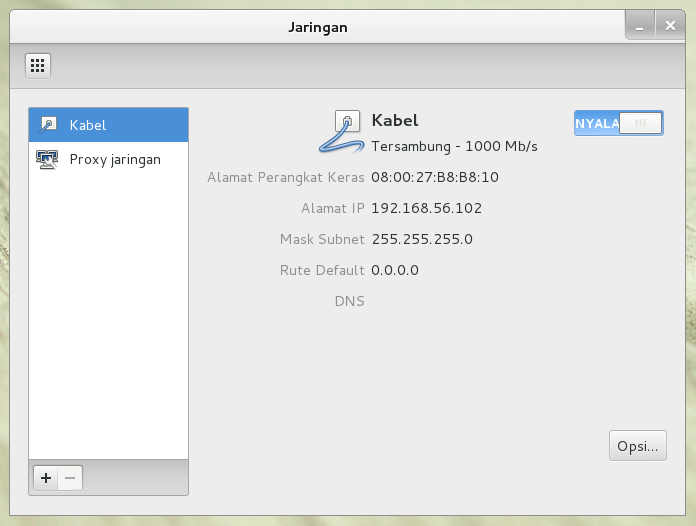
Figure 23. Setting the IP address configuration via the Network configuration (Network)
Some things you can do with the Network Manager are:
– Enable or disable a network connection. When not in use it’s good network connection is disabled, in order to save battery usage for computing devices that use it.
– Manage a wired network, such as selecting the type of addressing whether using DHCP or manually.
– Manage wireless networks.
– Determine the proxy to be used to connect to the internet.
