Remote System Administration
For network administrators remote administration is a common thing to do. Hereby an administrator does not need to be in the location server. Linux system administration can vary include application installation, system updates, and data backup. In Linux there are many applications that allow the user to access the computer remotely. SSH (Secure Shell) is a remote access protocol that is widely used in Linux.
This protocol is used for data encryption features. It is important that small possibility of eavesdropping by parties who are not responsible. OpenSSH is one of the applications that implement this SSH protocol. Through this application access to the server computer can be done from another computer in text mode. The application consists of two parts, the server and client applications. The application server is an application that provides access to the terminal by a computer system to the user’s computer is different.
While the client application is an application used by a user to access this remote terminal (SSH server). By default the application is not installed. In addition it can be used to access the terminal remotely. SSH protocol can also be used for exchanging files. As a client application are:
– Ssh, a program run through the terminal in Linux
– Putty, SSH client program that can be run at the command prompt and also has a GUI display.
– File management application that has been included for the SSH protocol can access the SSH server, such as Files, Dolphin and Nautilus in Linux and WinSCP on Windows.
Here is an example of using the application access Files on Ubuntu.

Figure 35. Start an SSH server access through the Files application.

Figure 36. Entries password to log into the SSH server

Figure 37. The final result access to the SSH server to send the file.
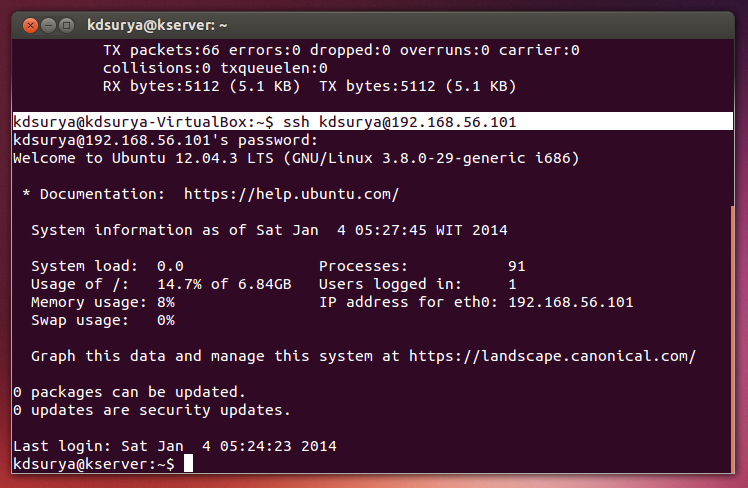
In addition to the above example, the following merupkan display computer terminal server accessed via ssh client application.